









Clinic Assistant
Talk with patients to learn about their medical history.

Section A: The Brief
Careers can start with one email, here's yours.


Welcome to the Clinic Assistant experience with VirtualCareNow!
I’m Alan from Astranda, and I’ll be your mentor.
VirtualCareNow is a telemedicine startup that connects doctors and patients online.
You’ll step into the role of a Clinic Assistant and learn an important skill in medicine – clinical history taking. You’ll ask questions, gather patient information, and understand how this step builds trust in healthcare.
This is your chance to explore the digital side of healthcare and see how telemedicine is changing UAE.
Regards,
Alan
alan@astranda.com | Head of Partnerships
Section B: The Job
Step into the role.
Clinic Assistant

Level: Foundation

Duration: ~6 Hours


Result: Performance Report
Role Description: Support healthcare consultation team by taking patient history notes.
Key Performance Indicators: Clear communication and structured notes.
Key Deliverables
By the end of this experience, you will have created:
Here are some key details to keep in mind as you work:

Why is this important: It helps doctors and nurses make better medical decisions



Expert tip: Listen carefully and ask open-ended questions like “Can you tell me more about when this started?”
Section C: The Workflow
Phase 1: Preparation
Step 1.1 - Prepare for Patient




Transcript
RE: Welcome to the VirtualCareNow team!
Hello,
Welcome to the VirtualCareNow team, we’re excited to have you on board!
Before you start working with patients, it’s important to understand what “history taking” means. Nurses and doctors can’t make good decisions without asking the right questions.
To start working with us, you’ll first need to learn the five main parts of a patient’s history:
Chief complaint
History of present illness
Past medical history
Medications and allergies
Social and family background
Will you please start by:
Researching each of these five parts.
Writing two example questions for each.
Creating a short one-page sample transcript showing all ten questions.
Write 3 tips on how to complete this process.
To help you, I’ve added a short video and link from Dr. Rishi Desai who gives great advice on how to do this step.
When you finish, save your work so we can examine it later.
Regards,
Dr. Fatima
Clinic Administrator
VirtualCareNow
Attachment: Video-Medical-History-Tips.mp4

Phase 2: Consultation
Step 2.1 - Patient Consultation
Patient History
RE: Welcome to the VirtualCareNow team!
Hello,
Great job on your transcript, it’s now time for the final stage of the process!
You’re going to practice your own telemedicine session. This means you’ll pretend to talk to a patient and collect their medical history.
Choose one of these cases for your patient:
Headache
Sore throat
Back pain
Cough
Our other Clinic Assistants follow these steps to do their practice consultations:
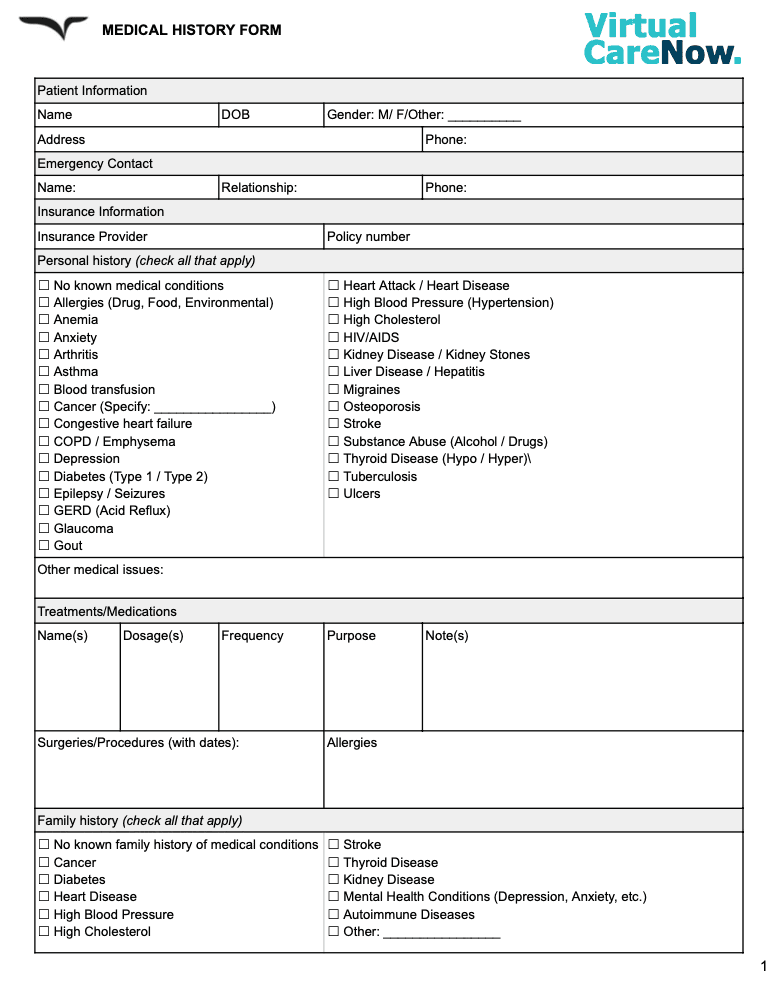
1. Prepare a Consultation Record spreadsheet or form
Open Google Sheets/Docs (see sample attached below).
Create a simple table with the following columns:
Patient Name
Age
Main Complaint
Questions You Asked
Patient’s Answers
Notes or Observations
Next Steps for the Doctor
You’ll fill this in while or after you record your consultation.
2. Record your Consultation Video or Audio Clip
Ask a friend or family member to pretend to be a patient.
Create a short 2-minute video or voice note where you are a Clinic Assistant talking through a patient's history.
Ask clear, friendly questions.
Show empathy and active listening.
When you’ve completed your spreadsheet and recording, you’re ready to submit.
Well done completing the Clinic Assistant experience! Thanks from all the team at VirtualCareNow, we would love to have you join us again for more advanced experiences.
Regards,
Dr. Fatima
Clinic Administrator
VirtualCareNow
Attachment: Sample-History-Form.jpeg
Congratulations on finishing the Junior Talent Scout experience with Soliq Sports Group (SSG)!
You’ve done an amazing job researching young athletes, spotting new talent, and creating a pitch to show who deserves a place on Soliq’s team. That’s exactly what real talent scouts do!
Here’s what you’ve learned along the way:
How to look for signs of talent and potential in young athletes.
How to think about personality, teamwork, and fit for a brand.
How to build a simple pitch to share your ideas with Soliq’s management team.
Your work shows how real sports agents help athletes grow and get discovered. Be proud — this experience gave you a real taste of what it’s like to work in the world of professional sports!
Once you submit your final work and receive feedback, add it to your CV/LinkedIn under Projects as: “Astranda × Soliq Sports Group — Sponsorship Assistant.”
Quick reminder, please follow the Submission Guidelines below to finalize your completion.
This is a meaningful step toward a career in the sports sector. We’re proud of your progress, and you should feel confident knowing you have what it takes to keep moving forward. Keep stacking achievements and experiences that set you apart.
Regards,
Alan
alan@astranda.com | Head of Partnerships
How to Submit
Submit your work, get feedback, certificates and more.
Submission Guidelines
Put everything in one folder
Name it:
Astranda_[ExperienceName]_[YourFullName]_[School]Include your docs, slides, videos, images, and any source files.
Upload to Google Drive
Open Drive → New → Folder (use the name above) → upload your files.
If your work is in Google Docs/Slides/Sheets, make sure each file has a clear title.
Set sharing permissions
Right-click the folder → Share → General access: Anyone with the link → Viewer.
Important: Do not require sign-in and do not give edit access.
Double-check by opening the link in an incognito window—if you can view it without logging in, you’re good.
Enter your details below:
How to Submit Your Work (via Google Drive link)
Put everything in one folder
Name it:
Astranda_[ExperienceName]_[YourFullName]_[School]Include your docs, slides, videos, images, and any source files.
Upload to Google Drive
Open Drive → New → Folder (use the name above) → upload your files.
If your work is in Google Docs/Slides/Sheets, make sure each file has a clear title.
Set sharing permissions
Right-click the folder → Share → General access: Anyone with the link → Viewer.
Important: Do not require sign-in and do not give edit access.
Double-check by opening the link in an incognito window—if you can view it without logging in, you’re good.
Copy your sharable link
Right-click the folder → Copy link.
Email your submission
Subject:
Submission: [ExperienceName] – [Your Full Name] – [School]Body: Paste the link and write a professional email including these details - Name: [Your Full Name], School: [Full School Name], Experience: [ExperienceName], Drive Link: [paste your view-only folder link]
Final checks before sending
The link opens without “Request access.”
All files load and play (videos, slides, etc.).
File names are clear and professional.
No personal data you don’t want shared.
Receive feedback
We will examine all your submitted materials
We will reply with your Performance Report and Certificate of Completion via email within 7 days
We will also share your next experience to continue your progress towards your dream career
If you want to try a different career path, please email alan@astranda.com.
Tips
Large videos? Upload to the same folder (don’t attach to the email).
Multiple versions? Keep only the final in the root folder; move drafts into a “Drafts” subfolder.
Keep a backup copy for your records.